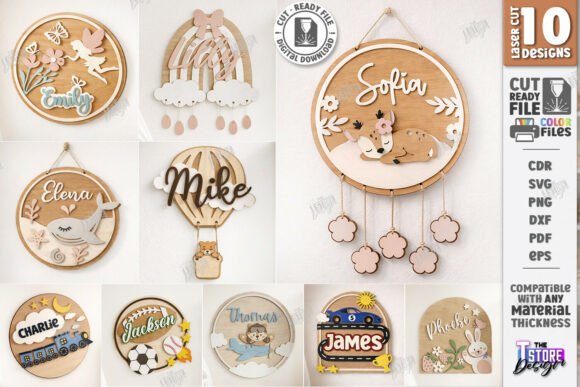
3D Kids Room Name Signs Laser Cut Bundle
Creating a personalized nursery or children’s bedroom involves more than just selecting paint colors and furniture; it requires integrating unique design elements that reflect the child’s personality while maintaining aesthetic cohesion. For hobbyists, small business owners, and makers utilizing laser cutting technology, the 3D Kids Room Name Signs Laser Cut Bundle offers a streamlined solution for producing high-quality, layered wall decor. This digital asset pack is not merely a collection of images but a functional toolkit designed to integrate seamlessly into existing production workflows, allowing creators to move from concept to finished product with minimal friction.
Understanding the Digital Asset Structure
The core value of this bundle lies in its multi-format compatibility. When working with laser cutters such as Glowforge, Silhouette, or Cricut machines, file format compatibility is often the primary bottleneck in the creative process. The inclusion of SVG, EPS, DXF, PDF, and PNG files ensures that users across different software ecosystems can utilize these designs without conversion errors or loss of fidelity.
- SVG and EPS Files: These vector formats are essential for precise cutting paths. They allow for scalability without pixelation, ensuring that whether you are cutting a small name tag or a large room sign, the edges remain crisp and accurate.
- DXF Files: Crucial for users operating within AutoCAD or other engineering-focused CAD software, providing geometric precision for complex layered structures.
- PNG and PDF Files: While primarily used for visualization or engraving references, high-resolution PNGs serve as excellent guides for alignment and material selection before committing to the final cut.
By providing ten distinct designs in each format, the bundle reduces the administrative overhead of sourcing individual assets. This consolidation allows creators to focus on execution rather than file management. The zip archive structure further aids in organization, keeping all related assets for a specific theme together, which is vital for maintaining consistency in a batch production environment.
Workflow Integration: From File to Finished Product
Implementing these designs into a physical product requires a clear understanding of how the software interprets line weights and colors. The bundle utilizes a standard color-coding system that is critical for successful output:
- Red Lines (Cut): These paths instruct the machine to slice completely through the material. In most laser cutting software, red is assigned to the cutting layer, typically using a higher power and speed setting appropriate for the thickness of the wood or acrylic being used.
- Black Lines (Engrave): These paths indicate areas where the laser should burn or etch the surface without cutting through. Black is universally recognized by most firmware as an engraving instruction, usually requiring lower power and slower speeds to create contrast without structural damage.
Before initiating any production run, it is imperative to verify that your cutting machine and software are compatible with these instructions. Misalignment between the software’s interpretation of color codes and the machine’s configuration can result in wasted materials and ruined projects. A quick test cut on scrap material is recommended to calibrate power and speed settings, particularly when switching between different types of wood, such as basswood, birch plywood, or MDF.
Design Themes and Market Versatility
The versatility of the 3D Kids Room Name Signs Laser Cut Bundle stems from its diverse thematic range. Each design—whether it be a Rainbow Fairy, Woodland Animal, Sports motif, Hot Air Balloon, Whale, Train, or Racing Car—is engineered to support 3D layering. This layering technique adds depth and visual interest, transforming flat text into a tactile object that stands out on a nursery wall.
For entrepreneurs selling handmade goods on platforms like Etsy or at local craft fairs, this variety allows for targeted marketing strategies. You can curate collections based on trending themes or seasonal demands. For instance, a "Woodland" theme might appeal to parents seeking a rustic, natural aesthetic, while "Sports" or "Racing Car" designs cater to dynamic, energetic decor preferences. The ability to offer personalized names within these themes significantly increases the perceived value of the product, moving it from a generic decoration to a custom gift item.
Personalization as a Workflow Step
One of the key advantages of using vector-based SVG files is the ease of personalization. Before sending the file to the cutter, you can modify the text layer to insert the child’s name. Most vector editing software allows for font substitution and text resizing without distorting the surrounding graphic elements. This step should be performed carefully to ensure that the text fits proportionally within the design’s bounding box. If the name is too long, it may overlap with the decorative elements, compromising the 3D effect. Planning the layout during this stage prevents costly errors during the cutting phase.
Material Selection and Quality Control
The success of a 3D layered sign depends heavily on material choice. Thin woods like basswood or light-colored birch plywood are ideal because they provide a smooth surface for engraving and clean cuts. Thicker materials may require multiple passes, increasing production time and energy consumption. Additionally, the grain direction of the wood can affect the appearance of engraved lines; aligning the grain parallel to the longest dimension of the sign often yields a more uniform finish.
Quality control should involve checking the fit of the layers. Since the designs are layered, pieces must slide together snugly. If the cut is slightly loose due to kerf (the width of the laser beam removing material), spacers or glue dots may be necessary to secure the layers. Conversely, if the fit is too tight, adjustments to the scale or software offset settings may be required. Consistency in these checks ensures that every unit produced meets the same high standard, which is crucial for building customer trust and reducing return rates.
Long-Term Use and Customer Engagement
Acquiring this bundle is not a one-time transaction but an investment in ongoing content creation. By following the creator, customers gain access to future releases, allowing them to expand their inventory without constantly searching for new designers. This continuous stream of fresh designs keeps a shop relevant and encourages repeat purchases from other makers who rely on up-to-date trends.
Furthermore, the digital nature of the product means there is no inventory risk. Once purchased, the files can be used indefinitely for personal projects or commercial production, subject to the license terms provided by the seller. This flexibility supports agile business models where production can be scaled up or down based on demand without the burden of holding physical stock.
Technical Support and Customization Requests
While the bundle includes a comprehensive set of standard formats, specific project requirements may necessitate additional file types or modifications. The option to request other file types or specific PNG sizes highlights the importance of communication in the digital asset market. If a particular workflow requires a different resolution or a non-standard vector format, reaching out to the creator can save significant time spent on manual conversions.
Similarly, having a direct line of communication for troubleshooting ensures that technical issues do not stall production. Whether it is a question about layer order or advice on optimal cutting settings for a specific material, support channels add value beyond the initial download. This level of service fosters a reliable relationship between the designer and the maker, enhancing the overall user experience.
Conclusion
The 3D Kids Room Name Signs Laser Cut Bundle represents a practical, efficient resource for anyone involved in laser cutting and personalized decor. By combining versatile designs with robust file compatibility and clear operational guidelines, it simplifies the path from digital idea to physical reality. For professionals and hobbyists alike, integrating this bundle into their workflow enhances productivity, allows for greater creative expression, and supports the development of a cohesive, high-quality product line. Success in this niche relies not just on the design itself, but on the meticulous attention to preparation, material selection, and technical execution that the bundle facilitates.